
Customs declaration to be discharged
You can submit details of several different customs declarations to be discharged with a single discharge notification. However, on one “Customs declaration to be discharged” page you can only provide details of one customs declaration.If needed, add customs declarations to be discharged by clicking on “+ Add customs declaration to be discharged”.
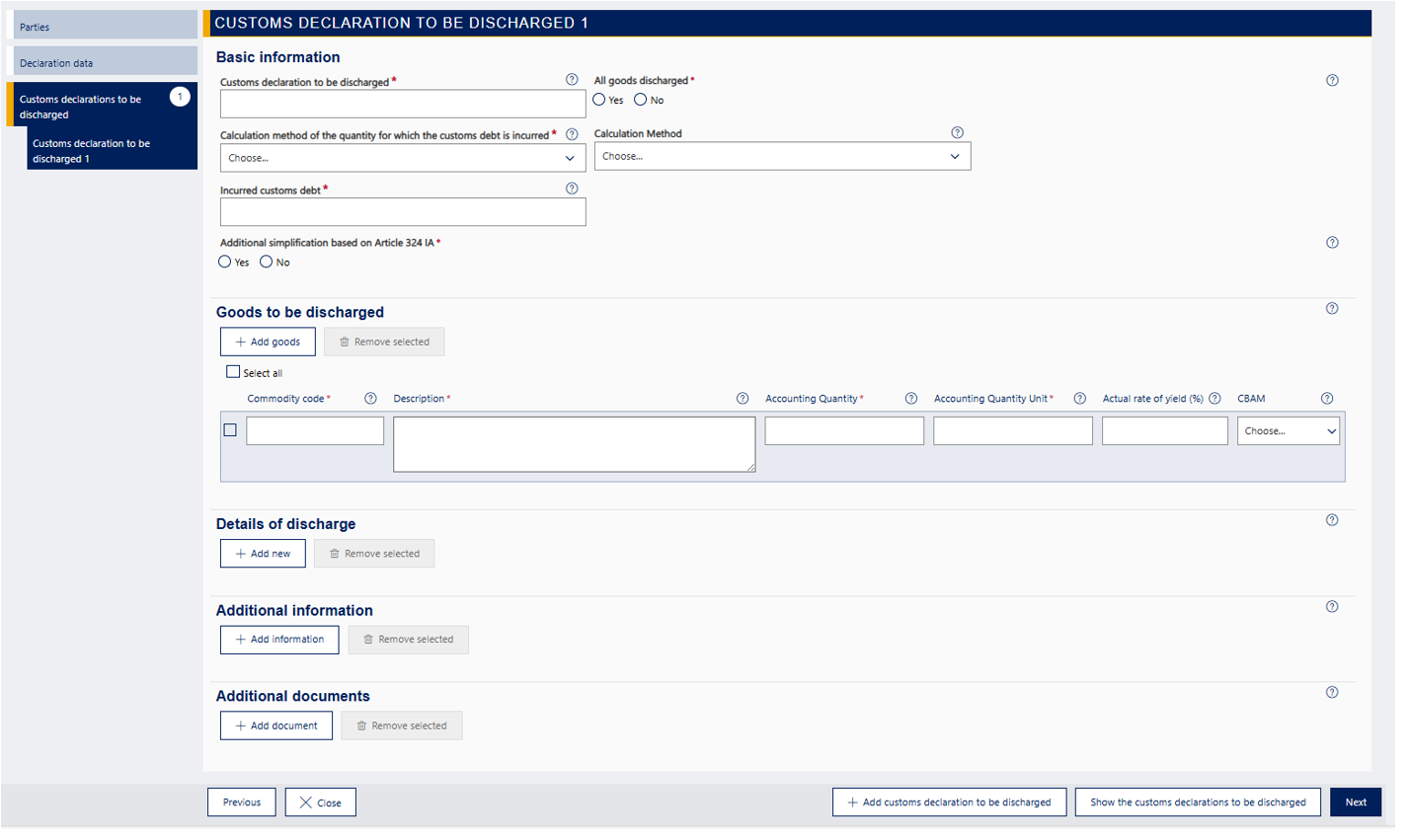
Details on the page “Customs declaration to be discharged”:
- basic details
- goods to be discharged
- details of discharge
- additional information
- additional documents.
Basic information
Provide here the required basic information about the item. Read the detailed guidance below.
Customs declaration to be discharged
Provide here the MRN of the customs declaration to be discharged. If the goods were placed under the procedure using a simplified customs declaration or a presentation notification, provide the MRN of the simplified customs declaration or presentation notification.
All goods discharged
A discharge notification can only be submitted if all the goods placed under the special procedure have been placed under a subsequent customs procedure or used for the prescribed end-use. All the goods covered by the customs declaration to be discharged must be discharged at the same time, so you can only choose “Yes”.
Calculation method of the quantity for which the customs debt is incurred
You should only provide this detail when you are discharging the inward processing procedure.
Choose the customs debt article from the drop-down menu:
- If you indicated that a customs debt is being incurred for the goods to be discharged, enter the customs debt article based on which the customs debt is being incurred.
- If you indicated that no customs debt is being incurred for the goods to be discharged, enter the customs debt article in accordance with the authorisation.
Calculation method
You should only provide this detail when you are discharging the inward processing procedure.
If you chose the customs debt article UCC 86(3) (the customs duties are levied on the goods placed under the procedure), you must also choose the calculation method of the import duty. Choose either the quantitative scale method “DA 72(2)” or the value scale method “DA 72(6)”.
Incurred customs debt
Provide the amount of unlevied customs debt incurred for the goods to be discharged. If no customs debt is incurred for the goods to be discharged based on the bill of discharge, enter zero here.
For example, a customs debt may be incurred for the goods to be discharged if the customs declaration discharging the procedure has not been submitted and you do not notice that until you are submitting a discharge notification.
Additional simplification based on Article 324 IA
You should only provide this detail when you are discharging the inward processing procedure.
In the bill of discharge, you should indicate if you have used special cases referred to in the IA as declarations discharging the inward processing procedure and the simplified discharge of the procedure referred to in Article 324(1) IA is mentioned in the authorisation.
Choose
- “No” if you have applied for the authorisation with a customs declaration or if simplified discharge of the procedure is not mentioned in the authorisation.
- “No” if simplified discharge of the procedure is mentioned in the authorisation, but you have not used it.
- “Yes” only if simplified discharge (Article 324 IA) is mentioned in the authorisation for inward processing and you used it.
Goods to be discharged
Here you should provide detailed information of the goods placed under the special procedure for which you are submitting a discharge notification.
If the declaration to be discharged contains several goods items, the details of each goods item must be provided on separate rows. Add rows by clicking on “+Add goods”.
Commodity code
Provide the 10-digit commodity code of the goods placed under the special procedure.
Description
Provide the exact goods description of the goods placed under the special procedure.
Accounting quantity
Provide the quantity of the goods placed under the special procedure as entered in the records.
As for temporary admission, provide the number of articles or similar information provided in the customs declaration for the procedure.
Accounting quantity unit
Provide the quantity unit entered in the records. As for temporary admission, provide the type of quantity provided in the customs declaration, such as number of articles.
Note that you can only use the measurement units mentioned in code list CL059. Check the measurement units in code list CL059.
Actual rate of yield (%)
Provide the actual rate of yield as a percentage if you are submitting a bill of discharge for the inward processing or end-use procedure.
Provide the actual rate of yield of the products obtained under the procedure as a percentage. You cannot use a calculated yield interval. Provide the actual rate of yield as follows:
- If the actual rate of yield is provided as a percentage, provide it under “Actual rate of yield (%). Provide the percentage with two decimals, without the per cent sign (e.g. 99,00).
- If the actual rate of yield is not provided as a percentage, but e.g. as a quantity, provide it later under “Additional information” with the additional information code FIXRY. Under “Description”, you should provide a verbal description of the actual rate of yield.
CBAM
It is optional to provide CBAM goods here.
Details of discharge
Here you provide detailed information on the discharge of the procedure. The required details depend on the special procedure you are discharging.
If more than one customs declaration discharging the procedure has been submitted for the special procedure, the details of the customs declarations must be provided on separate rows. Add rows by clicking on “+Add new”.
If the procedure has been discharged by abandonment of the goods to the State or destruction of the goods, provide the document verifying this as an additional document for the discharge notification.
Subsequent MRN
Provide the MRN of the customs declaration discharging the procedure, e.g. the MRN of a re-export declaration or the MRN of a customs declaration for release for free circulation.
Use of equivalent goods
Indicate whether you have used equivalent goods or not.
- Choose “No” if the use of equivalent goods is not permitted in the written authorisation or if you do not have a written authorisation.
- Choose “Yes” if the use of equivalent goods is permitted in the written authorisation and you have used equivalent goods.
- Choose “No” if the use of equivalent goods is permitted in the written authorisation, but you have not used equivalent goods.
This detail is provided in all other notifications of discharge for special procedures except when you are submitting a notification of discharge for the procedure “48 – entry for home use with simultaneous release for free circulation of replacement products under outward processing prior to the export of the defective goods”.
CBAM
It is optional to provide CBAM goods here.
Used for the prescribed end-use
When you are submitting a bill of discharge for the procedure 44, indicate how the goods have been used for the prescribed end-use. Provide a free-form verbal description here.
If the end-use procedure is discharged by export outside the EU under the procedure 1044 and additional procedure 695 and you have provided the export declaration under “Subsequent MRN”, you should also provide here at least the text “Exported with permission from the supervising customs office”.
Start date of use
You should only provide this detail when you are submitting a bill of discharge for the end-use procedure.
Provide the start date of use, that is, the date when the goods were used or began to be used for prescribed end-use.
If the end-use procedure is discharged with export outside the EU under the procedure 1044 and additional procedure 695 and you have provided the export declaration under “Subsequent MRN”, you should also provide the date of export of the goods here under “Start date of use”.
End date of use
Provide the end date of use if the goods were used for the prescribed end-use during a specific period of time. Otherwise the detail should not be provided.
Exported goods
You should provide this detail if you are submitting a discharge notification for the following customs procedures:
- “46 – Import of processed products obtained from equivalent goods under the outward-processing procedure before exportation of goods they are replacing”
- “48 – Entry for home use with simultaneous release for free circulation of replacement products under outward processing prior to the export of the defective goods”.
Provide a detailed description of the goods declared with the export declaration that discharges the procedure.
Additional information
Provide the necessary additional information. If you need to provide additional information on the goods item, you can add it by clicking on “+ Add information”. Select the additional information code from the drop-down menu for the field “Code”. Provide the information that the additional information code requires in the field “Description”. You can select more than one additional information code, if necessary.
For example, if you do not provide the actual rate of yield as a percentage, provide it here with the additional information code FIXRY. You should also always provide a free-form description of the actual rate of yield. You should only use the additional information code FIXRY when you are submitting a bill of discharge for the inward processing or end-use procedure.
Additional documents
Provide the necessary additional documents. You can add an additional document by clicking on “+ Add document”. Fill in at least the columns “Type” and “Identifier”. Provide the additional document number, e.g. invoice number.
- Provide the import and export invoice (N830) in the details of the goods to be discharged, if you have not previously attached the invoices to the customs declarations for the goods to be discharged or goods placed under the procedure. Provide the identifier for the invoice.
- If the special procedure 44, 51 or 53 is exceptionally discharged by abandonment of the goods to the State, provide the additional document code 8TLV and the identifier of the document.
- If the special procedure 44 is exceptionally discharged by destruction of the goods, provide the additional document code 4HVT and the identifier of the document.
You can speed up the processing of the notification by uploading the attachment already when filling in the notification. If you want to upload a document as an attachment, click on “Upload file”. The supported attachment file types are PDF, JPG, PNG and TIF. Please note: You cannot attach Excel spreadsheet files. The maximum attachment size is 5 MB.
When you have uploaded the attachment, the service displays the column “Attached file” with the reference number issued by Customs.